
CS-Cart · Cloudflare

Built for CS-Cart stores using Cloudflare

Cloudflare settings—break them, roll them back.

Not another cache toy—insurance when one bad line hits orders and the storefront. Roll known-good rules back from CS-Cart; Pro is the full path.

CS-Cart admin: AP SafeCache backup history (live screenshot)

Still running the shop like this?

  • You change Cloudflare settings directly in the dashboard
  • You only investigate after something breaks
  • Recoveries are manual do-overs
  • You keep shipping without knowing which change hurt you

With SafeCache

  • Changes land in history automatically
  • Pick the snapshot when things go wrong
  • Restore in one click

It may already be broken before you notice

Any of this sound familiar?

  • Some storefront pages show no products
  • Login or session feels inconsistent
  • Cache is too sticky—changes never seem to show

If any ring true, the damage may already be live. The flow below is how you keep a rollback path to the last known-good state.

From a Cache Rule change to recovery

Not docs—your storefront. Rollback is only half the story; after restore, orders and the storefront return to business-normal.

Change a Cache Rule
Listing empty (revenue stops)
Pick the prior snapshot
Restore in one click

Real screens from the add-on in CS-Cart admin.

Enlarged admin screenshots

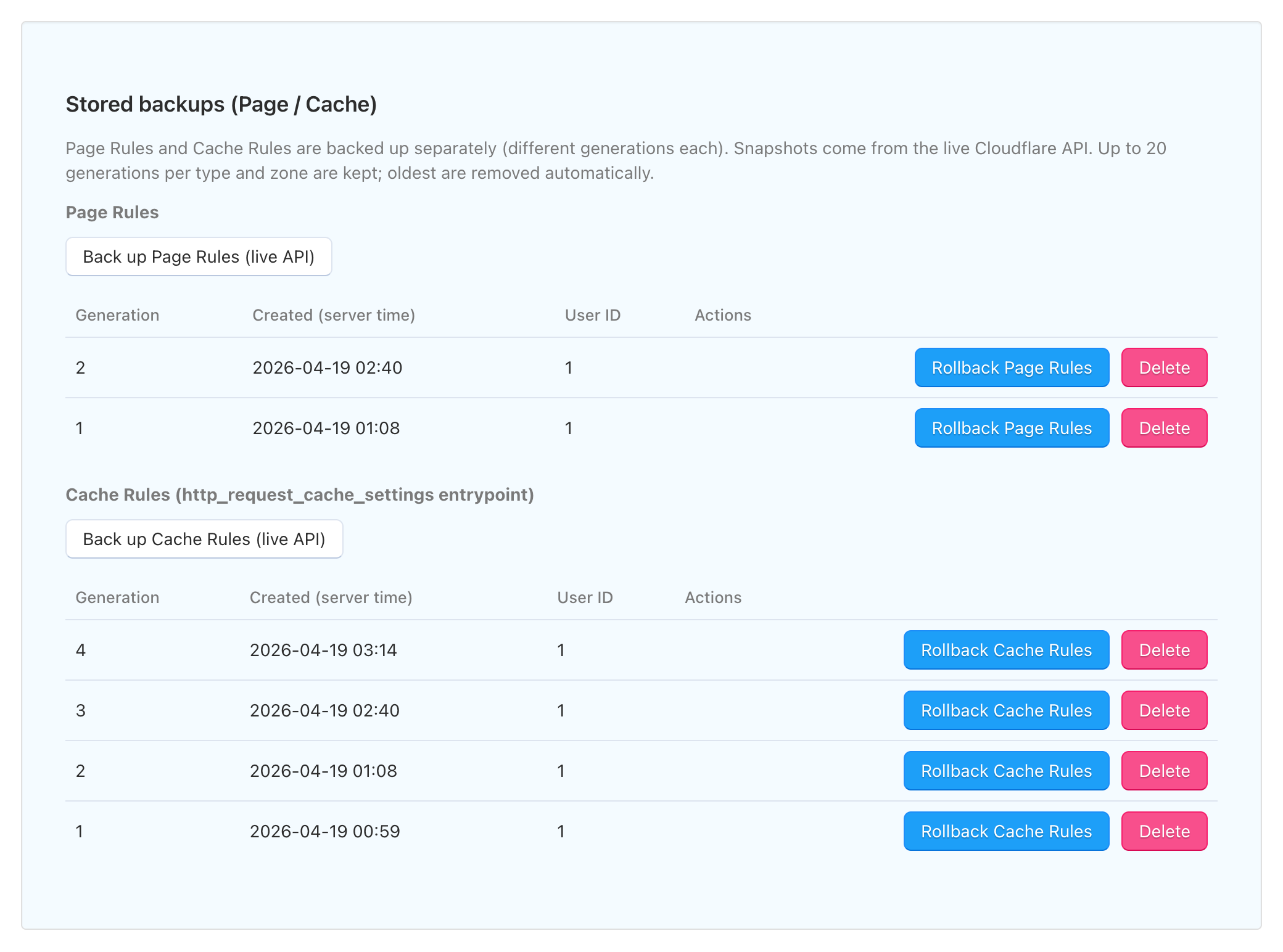
CS-Cart admin: AP SafeCache Page Rules and Cache Rules backup history
Backup history
CS-Cart admin: AP SafeCache Cache Rules editor with Cloudflare integration
Cache Rules editor
CS-Cart admin: AP SafeCache Cloudflare live configuration poll and fingerprint status
Live configuration poll
CS-Cart admin: AP SafeCache Ajax reload tracking log
Ajax reload tracking

Swipe horizontally to switch screens (or use arrow keys)

One line can shake the whole storefront

Sound familiar?

  • A single Cloudflare rule can unexpectedly hit checkout, APIs, and the admin—and break orders and cart behavior.
  • During an incident you want to return to the last working state—but you cannot tell what changed in the dashboard.
  • Handing CDN and cache settings to non-engineers feels risky.

Page Rules and Cache Rules are powerful, but mistakes can hit checkout, APIs, and the admin in one shot.

Without a fast path back to the last working state, people avoid touching Cloudflare during an outage—and slow rollback stacks revenue and trust damage.

What matters is stable behavior and a way to return to the last working state—not another dashboard that only talks about speed.

Typical ops vs SafeCache

Side-by-side comparison table
Dashboard-only SafeCache
Making changes Manual tweaks in the Cloudflare dashboard Drive rules from CS-Cart admin
During an incident Start with detective work Choose the prior snapshot
Recovery Rebuild settings by hand Restore in one click
Confidence Hope nothing else breaks Rollback is built into the workflow

Restore first—debug second

On Pro, Page Rules and Cache Rules are stored separately, and a new history entry is added only when the live configuration actually changes—so you always have a path back to the last working state.

During an incident, restore from a saved snapshot instead of guessing which line you changed in the Cloudflare UI—then realign checkout and the storefront and debug calmly.

Free covers fetch, review, and diff. Backups, rollback, and applying changes to Cloudflare are Pro.

History is the face of the product

The backup list and generations are the spine—that’s where you roll back and stop an outage from spreading.

Rules are read via the API, so the storefront runs behind Cloudflare (proxied).

Backups and rollback

What Pro delivers—in short.

  • Separate stores per rule type

    Page Rules and Cache Rules are backed up on separate tracks so you can reason about each area.

  • Up to 20 history entries

    Per zone, recent generations are kept within a fixed limit so history does not grow without bound.

  • Point-in-time snapshots

    Each entry is a snapshot of settings at that moment—compare or restore from it.

  • Detect Cloudflare-side changes and record them

    Fingerprints compare the live zone with the last snapshot and add history only when something actually changed—less noisy drift.

  • History grows only on real changes

    Because entries appear when the live config diverges from the last save, you spend less time guessing what moved in the dashboard.

  • Restore the last working state

    Restore stable behavior first, then dig into root cause—fewer fire drills for support and revenue.

Harder to miss unintended changes

Diffs and history make it easier to follow what changed on Cloudflare—including surprises that are easy to miss if you only stare at the dashboard.

Staying up beats vanity metrics

We care more about fewer outages and fewer panicked hotfixes than about synthetic speed scores—and about not breaking a caching design that already works.

Restore behavior first; you can still dig into root cause afterward.

Guardrails on risky work

High-impact steps are staged. Snapshots mean you are not forced to trust “whatever shipped last.”

Even under peak traffic, you can return to a stable configuration before a long postmortem.